Skip to content
  • Replace
  • Build
  • Founders
  • Listing system
  • Work
  • Marketing
  • Notes
ContactFree review

Built by Calkite · Listing Management System

Every listing, flyer, lead and report in one system you own.

A listing management system for commercial real estate brokerages. Listings, flyers, retailer maps and demographics, leads and tours, owner reports, SEO and AI writing, and the public website, all working from the same record. Request a demo and we will give you your own private copy to click through.

Request a demoSee what is inside
your-brokerage.calkite.com/dashboard
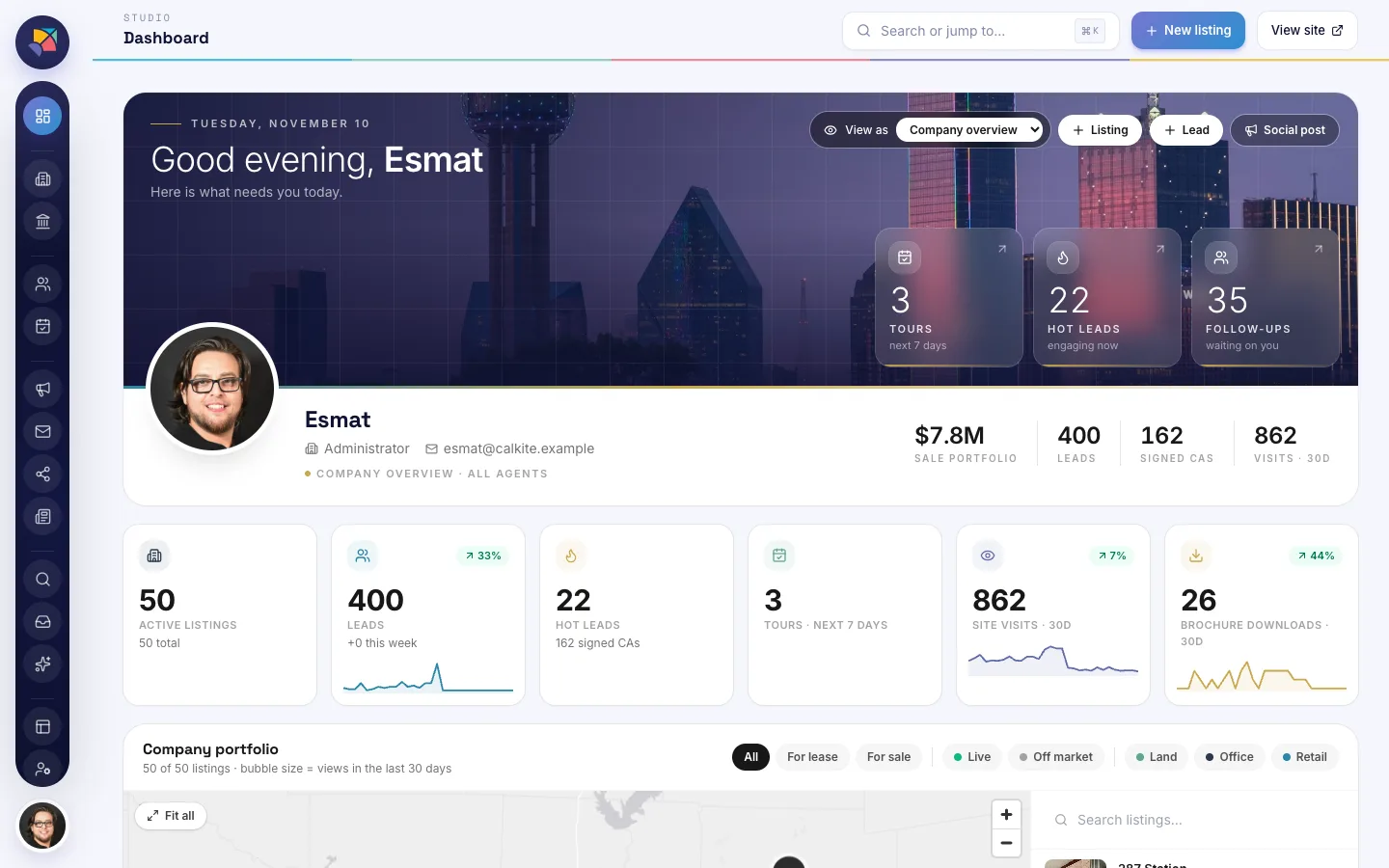
The agent dashboard: tours, hot leads and follow-ups for the week, portfolio totals, and a map of the company's listings.

The agent dashboard, on sample data

  • Your own private demo copy

    A sandbox made for you alone.

  • Approved within one business day

    A person reads every request.

  • Flyers, maps, reports, SEO and AI included

    Nothing is a paid add-on.

  • You own the system

    Built for your brokerage, not rented.

What is inside

Seven parts of one system.

Each screen below is from the demo brokerage, which runs on fictional and public sample data.

Listings

Listings, flyers, retailer maps and demographics.

Every property has its photos, pricing, status and a pin on the map. The flyer, the retailer map and the area demographics come from the same record, so nothing is typed twice.

  • A health score on each listing shows what is still missing
  • One click makes the flyer
  • Retailer maps and demographics sit beside the listing
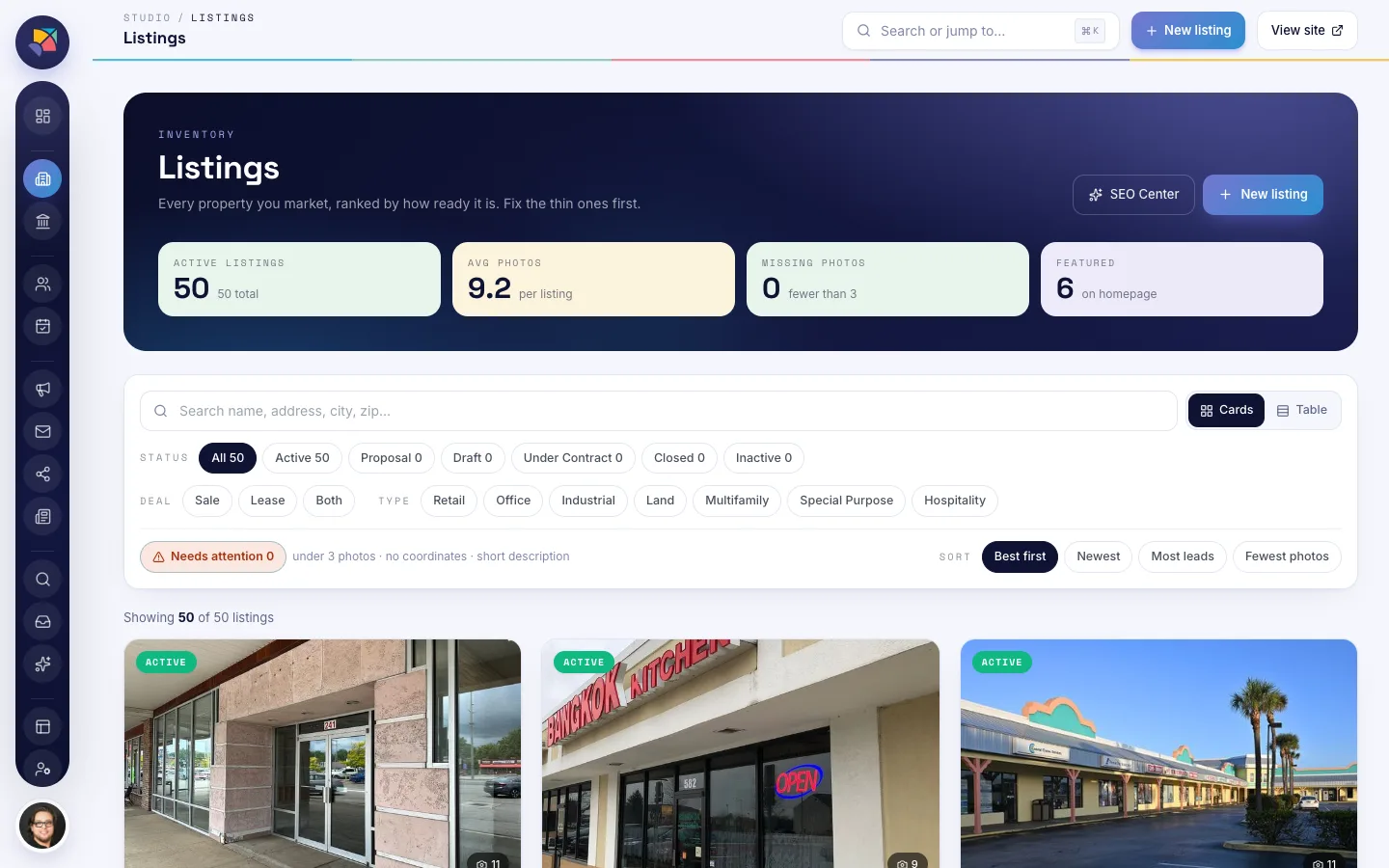
Listings screen: property cards with status, deal type and property type filters, a health score on each card and a count of listings that need attention.

Leads and tours

One pipeline for every inquiry and tour.

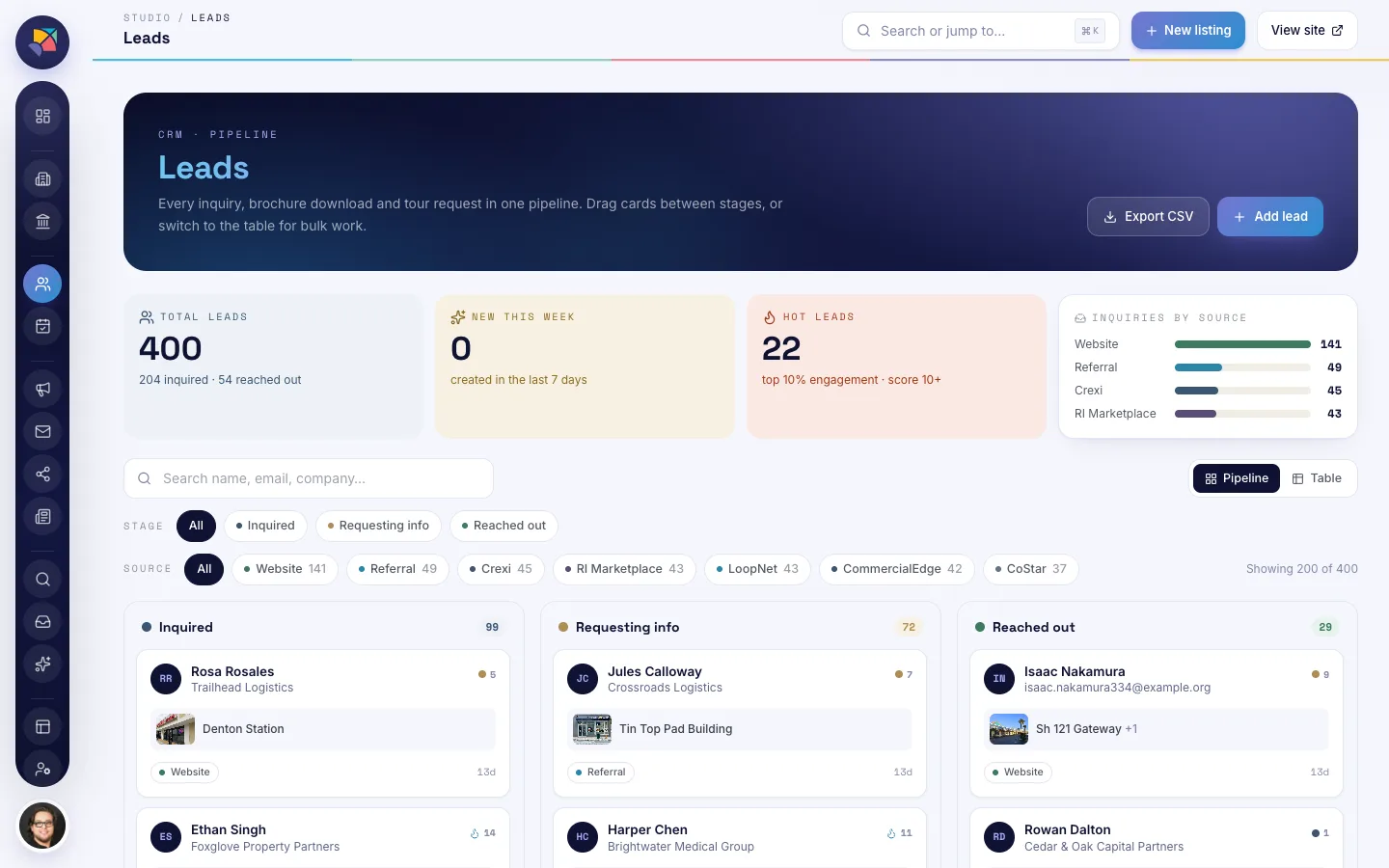
Inquiries, brochure downloads and tour requests land in one board. Drag a lead from stage to stage and filter by where it came from.

  • Sources include the website, referrals, Crexi, LoopNet and CoStar
  • Tours for the next seven days on each agent's dashboard
  • Hot leads and follow-ups waiting, per agent
Leads screen: a pipeline board with Inquired, Requesting info and Reached out columns, lead cards showing source and listing, and filters by stage and source.

Owner reports

Reports owners can read, with every channel logged.

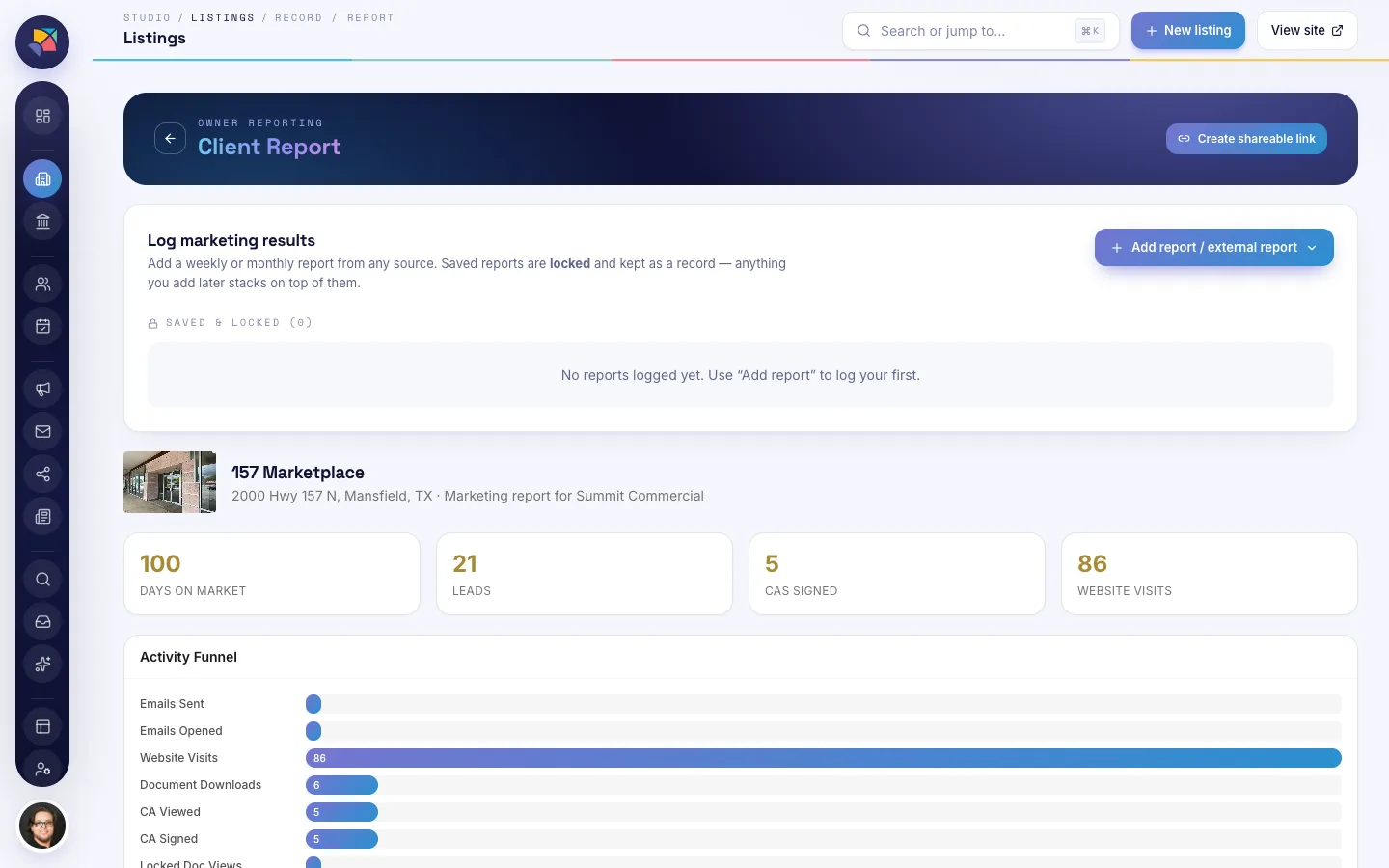
Log each listing's weekly or monthly results from CoStar, LoopNet, Crexi, social and email. Saved reports are locked as a record, and the owner opens theirs from a link that can be switched off.

  • CoStar, LoopNet and Crexi results logged for each listing
  • Social posts and email sends logged beside them
  • A report link you can disable at any time
Owner report screen: weekly and monthly results logged from LinkedIn, Instagram, email, a broker open house, CoStar, LoopNet and Crexi, with a report link that can be disabled.

SEO Center

Every listing scored, and the fixes in one place.

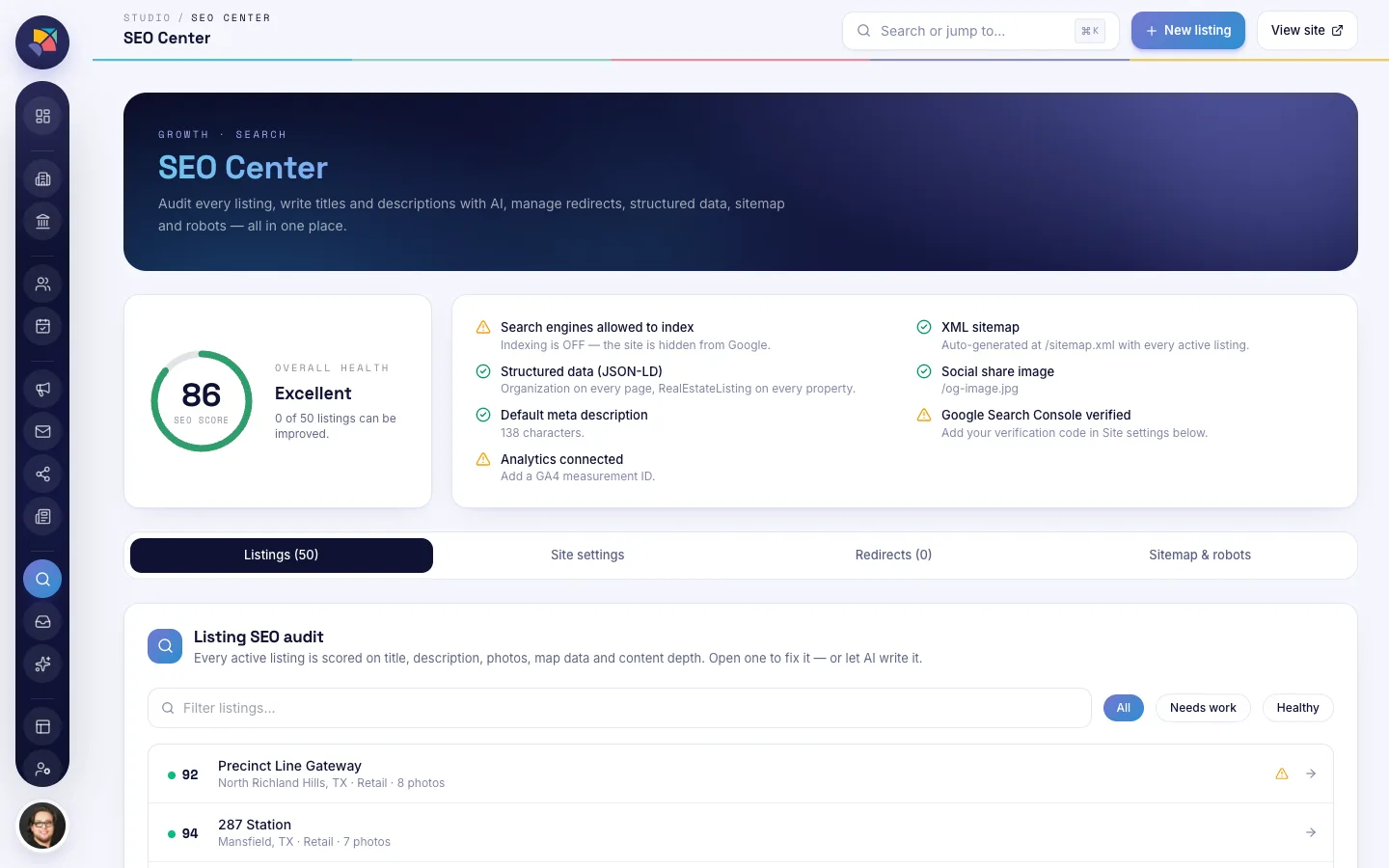
Titles, descriptions, photos, map data and content depth are scored for each listing. Redirects, structured data, the sitemap and robots.txt are managed in the same screen.

  • An overall score and a checklist
  • A listing-by-listing audit
  • AI can write the titles and descriptions that are missing
SEO Center: an overall SEO score, a checklist covering indexing, sitemap, structured data and meta descriptions, and a listing-by-listing audit with scores.

AI Studio

Drafts from the listing's own data.

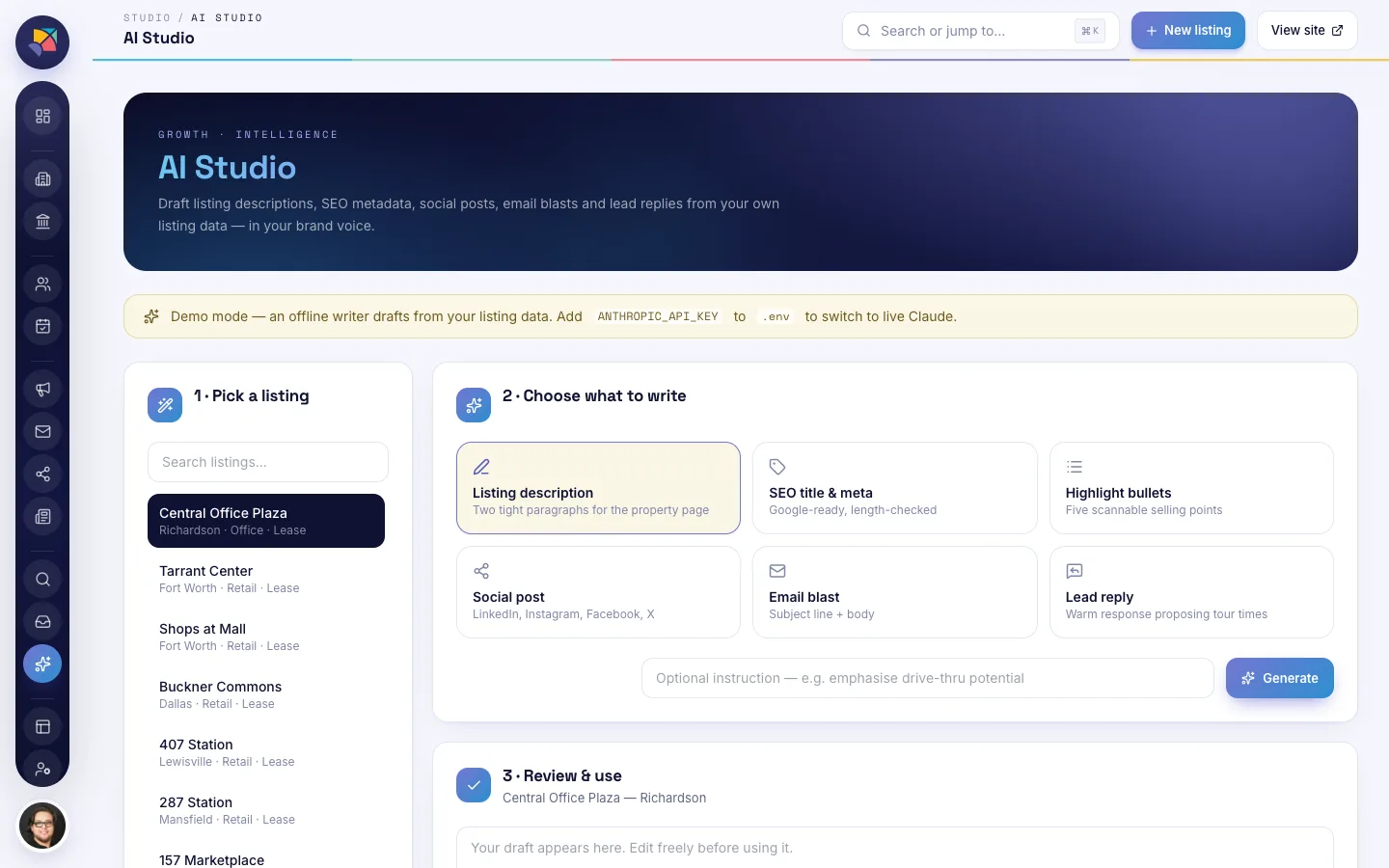
Pick a listing and choose what to write: a description, an SEO title, a social post, an email blast or a reply to a lead. Review and edit the draft before it is used.

  • Written from the listing's real details
  • Every draft is editable
  • Nothing is published without you
AI Studio: pick a listing, choose what to write, such as a description, SEO title, social post, email blast or lead reply, then review and edit the draft.

Site Studio

Change the public website without code.

Edit the announcement bar, choose which home-page sections show and preview the result before it goes live. The public site reads from the same listings as everything else.

  • Live preview of the public site
  • Home-page sections on or off
  • No developer needed for day-to-day changes
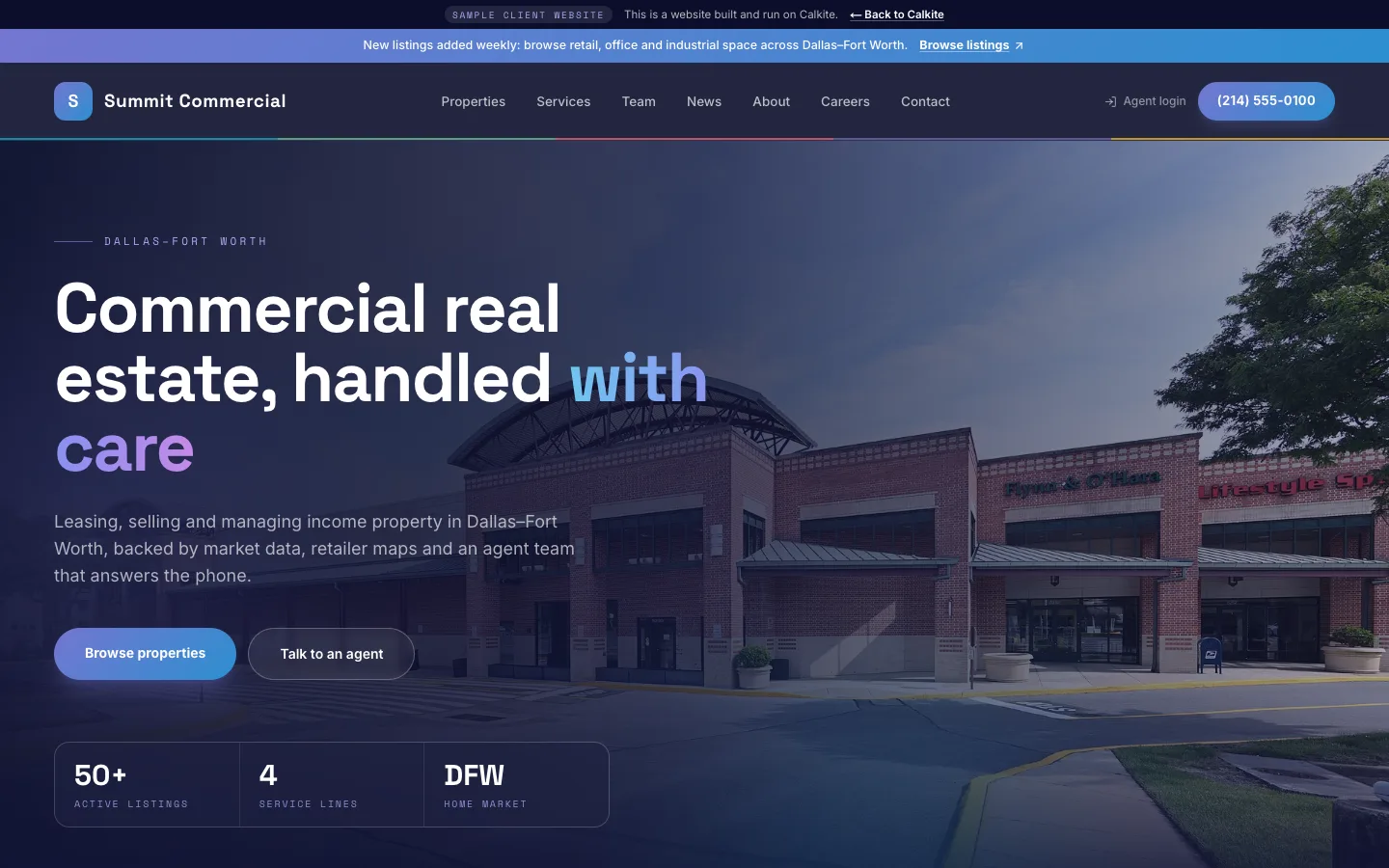
Site Studio: editing the announcement bar of the public website, with a live preview of the sample client website underneath.

Listing on and off

One switch takes a listing on or off the website, with a reason.

Each agent's dashboard shows their tours, hot leads and follow-ups, with their listings on a map. A listing goes on or off the public site with one switch, and the switch records why, so the office can see the history.

  • A reason is recorded with every change
  • Agents see their own listings; the office sees the company
  • The map shows what is live and what is off
Agent dashboard: tours, hot leads and follow-ups for the week, portfolio totals, and a map of the company's listings with an on and off switch beside each one.

How the demo works

Your own copy, in three steps.

What you change is saved for you and nobody else sees it.

  1. Step 1

    Request

    Tell us about your brokerage in the short form below. It takes a minute.

  2. Step 2

    We approve

    A person reads your request and approves it, usually within one business day.

  3. Step 3

    You get your own private copy

    We email a private link to your own copy of a sample brokerage.

Questions

Before you request a demo.

Is my data private?+

Yes. Your demo is a separate copy that only you can open. What you change is saved for you and nobody else sees it. The brokerage inside it is a sample made of fictional and public data.

How long does the demo last?+

14 days from the day we approve your request. If you want more time, reply to the email and ask.

Can I import my listings?+

Not into the demo, which runs on sample data. When the system is set up for your brokerage, your listings are brought in from the sources you use today. Tell us what you use in the form and we will say what that involves.

Who owns the system?+

You do. It is built for your brokerage and lives under your accounts, not on a vendor's per-seat plan.

Is it only for commercial real estate?+

It is built for commercial brokerages: retailer maps, demographics and CoStar, LoopNet and Crexi reporting come from that work. The same approach fits other listing-based businesses, so ask if yours is one.

Request a demo

Get your own private copy.

Tell us a little about your brokerage. We review every request within one business day and email you a private link, open for 14 days.

  • Nobody else sees what you change
  • No payment details asked for
  • Reply to the email and a person answers

We use your details only to review this request and send your demo link.

Want to see your listings in a system like this?

Tell us how your listings, leads and reports run today and we will show you what it takes to own one.

Get a free software review

Let’s talk.

hello@calkite.com(415) 425-9719

Custom software and systems you own. San Francisco.

49 Powell Street, San Francisco, CA 94102

What we do

  • Replace what you rent
  • Build what is missing
  • Build for founders
  • Replace Buildout

Industries

  • Commercial real estate
  • Construction

Start here

  • Listing system
  • Free software review
  • Rent vs own calculator
  • Work
  • Field Notes
  • FAQ

Studio

  • About
  • Contact
  • Privacy

Also from Calkite

  • Branding
  • Marketing
  • Personal brand

Calkite · San Francisco · Silicon Valley, CA

© 2026 Calkite

InstagramLinkedInFacebook